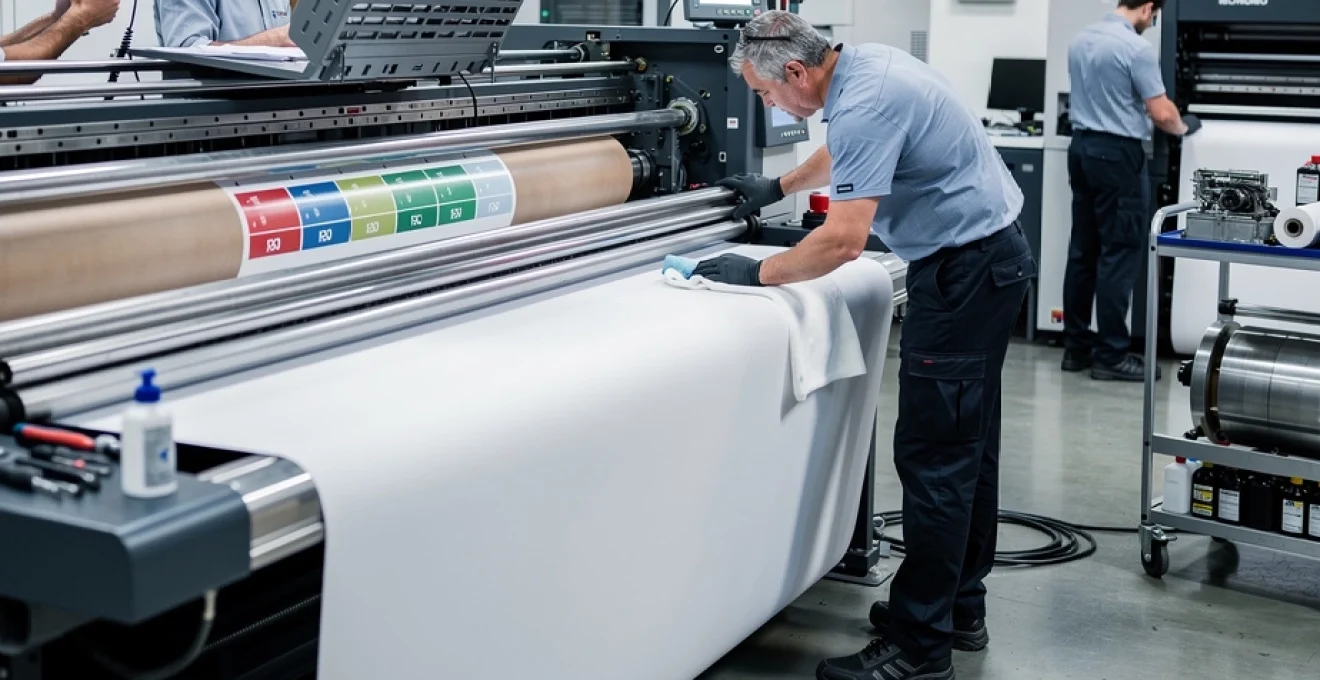
Commercial printing operations face unprecedented pressure to deliver high-quality output whilst maintaining cost-effective production schedules. The reliability of printing equipment directly impacts productivity, profitability, and customer satisfaction. Regular maintenance programmes serve as the cornerstone of operational excellence, preventing costly breakdowns that can halt production lines and damage client relationships. Modern printing environments, whether featuring traditional offset lithographic presses or cutting-edge digital systems, require systematic care to maintain peak performance. Preventive maintenance strategies have evolved from basic cleaning routines to comprehensive monitoring systems that predict equipment failures before they occur.
The financial implications of equipment downtime extend far beyond immediate repair costs. Production delays, missed deadlines, and emergency service calls create a ripple effect throughout the entire business operation. Industry studies indicate that unplanned maintenance events cost approximately three to five times more than scheduled preventive procedures. Furthermore, equipment operating without proper maintenance protocols experiences accelerated wear patterns, reducing operational lifespan by up to 40% compared to well-maintained machinery.
Preventive maintenance protocols for commercial printing systems
Preventive maintenance encompasses a structured approach to equipment care that prioritises scheduled interventions over reactive repairs. This methodology transforms maintenance from a cost centre into a strategic investment that protects capital assets and ensures consistent production capabilities. Commercial printing operations benefit significantly from implementing comprehensive preventive protocols that address mechanical, electrical, and software components systematically.
The foundation of effective preventive maintenance lies in understanding equipment specifications, manufacturer recommendations, and operational demands. Each printing system presents unique maintenance requirements based on technology type, production volume, and environmental conditions. Successful maintenance programmes integrate daily operational checks with periodic intensive servicing to create layered protection against equipment failures.
Daily calibration procedures for offset lithographic presses
Daily calibration routines form the backbone of offset press reliability, ensuring consistent colour reproduction and print quality throughout production runs. These procedures begin with ink density measurements across all printing units, verifying that colour values remain within specified tolerances. Operators utilise densitometers to assess solid ink density, dot gain characteristics, and colour balance parameters before commencing production work.
Temperature monitoring represents another critical calibration element, as thermal fluctuations directly affect ink viscosity and transfer characteristics. Press operators record fountain solution temperatures, ensuring optimal chemical balance for effective ink-water separation. Additionally, impression pressure settings require daily verification to maintain consistent print quality whilst minimising substrate damage and excessive wear on impression cylinders.
Ink viscosity testing and adjustment schedules
Ink viscosity management directly influences print quality, colour consistency, and press performance across all commercial printing applications. Regular viscosity testing prevents common issues such as ink misting, poor colour saturation, and inconsistent coverage that can compromise finished product quality. Professional printing operations implement hourly viscosity checks during active production periods, with more frequent testing during colour-critical jobs.
Temperature fluctuations, solvent evaporation, and contamination factors continuously alter ink characteristics throughout production runs. Automated viscosity control systems provide real-time monitoring capabilities, but manual verification remains essential for maintaining absolute quality standards. Proper ink conditioning extends consumable life, reduces waste, and minimises press cleaning requirements between job changes.
Paper path alignment verification using heidelberg speedmaster guidelines
Paper path alignment affects every aspect of printing performance, from registration accuracy to substrate handling efficiency. Heidelberg Speedmaster systems incorporate sophisticated alignment protocols that address gripper timing, transfer cylinder coordination, and delivery stack formation. These procedures require systematic verification using precision measuring tools and standardised test forms.
Misalignment issues manifest through various symptoms including registration drift, marking on substrate edges, and inconsistent sheet delivery. Regular alignment verification prevents minor deviations from developing into major mechanical problems that require extensive downtime to resolve. The alignment process encompasses feeder adjustment, impression cylinder parallelism, and delivery system synchronisation to ensure optimal performance standards.
Cleaning protocols for blanket cylinders and impression drums
Blanket cylinder maintenance represents one of the most critical aspects of offset press care, directly impacting print quality and press longevity. Daily cleaning removes accumulated ink residue, paper debris, and contamination that can cause marking, ghosting, and premature blanket deterioration.
Equally important is impression drum cleaning. Residual coating, spray powder, and paper lint on the impression drum can lead to pressure inconsistencies, gloss variation, and surface defects on the printed sheet. Best practice for reliable printing equipment is to combine fast, on-press cleaning cycles during job changes with deeper manual cleaning at the end of each shift. Using manufacturer-approved cleaning agents, lint-free cloths, and defined wipe patterns prevents surface damage and ensures that blankets and drums maintain their micro-texture and grip over thousands of impressions.
Pressrooms that document blanket and drum-cleaning frequencies typically see measurable reductions in unplanned stops and makeready waste. When operators record the type of contamination removed and any recurring defects, maintenance teams can correlate cleaning trends with specific substrates, inks, or finishing processes. This turns what might seem like a simple housekeeping task into a powerful diagnostic tool for predicting and preventing print quality issues.
Temperature and humidity control systems monitoring
Environmental control is often overlooked, yet it is fundamental to maintaining stable, high-quality output on offset and digital printing systems. Paper is hygroscopic, meaning it absorbs and releases moisture depending on ambient conditions. Excess humidity can lead to waviness, curl, and misfeeding, while low humidity increases the risk of static build-up and sheet separation problems. Reliable printing equipment performance depends on keeping temperature and relative humidity within narrow tolerances defined by both press and paper manufacturers.
Modern pressrooms deploy dedicated temperature and humidity control systems, often integrated into building management software. Daily monitoring should include logging ambient conditions at the feeder, delivery, and paper storage areas, not just a single central reading. Where possible, data loggers or IoT sensors can provide continuous tracking and alerts when conditions drift outside target ranges. Corrective actions—such as adjusting HVAC settings, using humidification systems, or conditioning paper stock in advance—reduce registration issues, colour drift, and mechanical stress on paper-handling components.
From a preventive maintenance perspective, the environmental control systems themselves require regular inspection. Filters need replacing, humidifier nozzles must be descaled, and sensor calibration should be checked at defined intervals. Treating temperature and humidity control as part of your regular maintenance plan, rather than a background utility, helps stabilise print behaviour and extends the life of rollers, belts, and electronic assemblies sensitive to thermal cycling.
Component-specific maintenance strategies for digital printing equipment
Digital printing equipment introduces a different set of maintenance challenges compared to offset presses. Where offset focuses on ink-water balance and mechanical registration, digital systems depend on precise electronic control, consumable management, and clean imaging paths. Because many commercial printers now operate hybrid environments with both offset and digital devices, aligning maintenance strategies across platforms is essential for predictable output and cost control.
Each digital engine—whether toner-based, inkjet, or liquid electrophotographic—has critical components with defined lifecycles and service intervals. Ignoring these guidelines often leads to intermittent artefacts, colour instability, and throughput reductions long before a complete failure occurs. By implementing component-specific maintenance schedules, you ensure that print heads, fuser assemblies, developer units, and imaging systems deliver consistent performance across long production runs.
Xerox DocuColor print head nozzle cleaning techniques
Xerox DocuColor and similar production colour devices rely on densely packed print head nozzles to deliver accurate, high-resolution images. Over time, these nozzles can become partially blocked by dried toner, dust, or environmental contaminants. The result is familiar: missing lines, banding, or subtle streaks that degrade overall print quality. Regular print head cleaning is therefore central to keeping digital printing equipment reliable and client-ready.
Most DocuColor systems provide built-in cleaning cycles, but relying exclusively on automated routines is rarely enough in a demanding production environment. Operators should schedule manual cleaning checks at least once per shift for high-volume applications, using manufacturer-specified swabs and cleaning fluids to avoid damaging delicate nozzle surfaces. Test patterns and nozzle check pages help you quickly identify which colour channels are affected and whether further intervention is required.
Why does this matter from a business perspective? Because even minor banding on a colour-critical job can lead to reprints, customer complaints, and wasted substrates. By treating print head nozzle cleaning like changing the oil in a car—routine, scheduled, and non-negotiable—you minimise downtime and avoid the much higher cost of replacing entire head assemblies prematurely.
Canon imagePRESS fuser assembly replacement intervals
For Canon imagePRESS systems, the fuser assembly is one of the most critical wear components influencing both print durability and surface appearance. The fuser applies controlled heat and pressure to bond toner to the substrate. As it ages, you may see gloss inconsistency, toner offset, wrinkling, or poor adhesion, particularly on heavy or coated stocks. These defects are strong indicators that the fuser has reached or exceeded its recommended lifespan.
Canon specifies duty cycles for each fuser model, often expressed in number of prints or coverage-adjusted impressions. Tracking these counts through the device’s internal counters or your print management software allows you to plan fuser replacement in advance, rather than waiting for a complete failure. In many commercial print environments, it is more cost-effective to replace fuser assemblies slightly early than to risk emergency service calls in the middle of a high-value production run.
When scheduling fuser maintenance, coordinate replacement with other periodic tasks—such as transfer belt cleaning, registration checks, and firmware updates—to consolidate downtime. Keeping a spare fuser assembly in inventory for critical devices can also be a wise investment, reducing lead times when usage spikes unexpectedly. In effect, you transform the fuser from a potential bottleneck into a controlled, predictable maintenance item.
HP indigo liquid ElectroInk system purging procedures
HP Indigo presses, using Liquid ElectroInk (LEP) technology, demand a more sophisticated approach to ink system maintenance. The LEP process relies on a finely balanced interaction between liquid ink, imaging blanket, and electrostatic charging. Contamination, pigment settling, or residual ink from previous jobs can disrupt this balance, resulting in grainy images, colour shifts, or background haze. That is why regular purging and conditioning of the ElectroInk system is non-negotiable for stable operation.
Purging procedures typically include circulating and discarding a controlled volume of ink from each colour station, followed by agitation or mixing cycles to re-suspend pigments. Operators should follow HP’s recommended schedules, which may vary depending on press utilisation, job mix, and idle periods. For example, after extended downtime or before colour-critical work, a more thorough purge helps remove micro-contaminants and ensures the ink behaves predictably.
Because LEP presses often run complex, high-value jobs, many plants integrate ink system checks into their start-of-shift routines. Monitoring ink temperature, viscosity (where applicable), and internal pressure readings gives an early warning of potential instability. Think of the ElectroInk system as the bloodstream of the HP Indigo platform: regular “health checks” and cleanses prevent small impurities from causing major performance issues.
Ricoh pro series developer unit lifecycle management
In Ricoh Pro Series devices and other dry-toner engines, developer units play a central role in transferring toner to the photoconductor drum. Over time, the magnetic and mechanical properties of the developer material degrade, leading to density loss, background fogging, and inconsistent colour across the sheet. If developer units are not replaced on schedule, operators may compensate by increasing toner density settings, which only masks the underlying problem and accelerates component wear.
Effective lifecycle management begins with tracking page counts and coverage profiles for each colour channel. Many Ricoh systems provide predictive alerts when developer components are approaching end-of-life, but it is good practice to verify those estimates against your actual workload and application mix. For example, a device running heavy solids and rich blacks will stress the black developer unit faster than one producing mostly text documents.
When developer replacement is due, follow the manufacturer’s handling and disposal guidelines carefully, as spent developer is a controlled waste in many jurisdictions. After installation, run the recommended calibration and toner density stabilisation routines to bring the engine back within specification. By treating developer units as strategic consumables rather than reactive replacements, you protect image consistency and avoid gradual quality drift that can be hard to detect day-to-day.
Mechanical wear analysis and lubrication scheduling
Beyond consumables, the long-term reliability of printing equipment depends heavily on managing mechanical wear. Every sheet that passes through a press or digital engine puts small but cumulative stress on gears, bearings, cams, and drive belts. Left unchecked, this wear can introduce vibration, misregistration, and noise, eventually culminating in sudden failures. Systematic wear analysis and lubrication scheduling transform these risks into manageable, predictable maintenance tasks.
How can you tell when mechanical wear is becoming a concern? Many operators rely on experience and sound, recognising when a press “doesn’t quite sound right.” While operator intuition is valuable, data-driven approaches provide greater reliability. Vibration analysis, thermal imaging, and periodic torque measurements help identify bearings or drive elements that are beginning to fail. Even simple visual inspections of roller shafts, gear teeth, and cam followers—documented with photos—can reveal subtle changes over time.
Lubrication is the first line of defence against premature wear. Following manufacturer-specific lubrication charts, with defined intervals and lubricant types, is essential. Over-lubrication can be as harmful as under-lubrication, causing contamination of paper paths, roller surfaces, and sensors. A disciplined approach involves assigning responsibility, logging every lubrication event, and marking access points so that nothing is missed during scheduled maintenance windows.
Many commercial print operations now align mechanical maintenance with lean manufacturing principles. For example, they synchronise lubrication and wear inspections with planned downtimes such as plate changes, shift handovers, or scheduled software updates. This integrated scheduling minimises disruption while ensuring that mechanical health is reviewed at consistent intervals. In larger plants, using a computerised maintenance management system (CMMS) to track wear indicators and lubrication tasks can significantly reduce unexpected failures and extend equipment lifespan.
Print quality degradation indicators and response protocols
One of the clearest signs that maintenance is overdue is a gradual decline in print quality. The challenge is that operators and customers often adapt to slow changes without noticing the full extent of degradation. Establishing objective print quality indicators and structured response protocols helps you detect issues early and address them before they impact client satisfaction or production efficiency.
Common indicators include banding, colour shifts, registration errors, dot gain anomalies, ghosting, and increased levels of paper dust or toner scatter on finished sheets. In high-performance environments, routine test charts—such as IT8 colour targets, greyscale ramps, and registration patterns—are printed at defined intervals and measured with spectrophotometers or densitometers. These measurements reveal trends long before problems are visible to the naked eye.
What happens when a deviation is detected? This is where response protocols come into play. A typical workflow might involve isolating whether the problem is substrate-specific, engine-specific, or workflow-related. Operators can run controlled tests on different devices, stocks, or RIP settings to narrow down the root cause. Once a likely source is identified—such as dirty transfer rollers, worn registration pins, or outdated colour profiles—a standard corrective action plan guides the next steps.
To keep these protocols accessible and consistent, many print shops maintain quick-reference guides or digital playbooks that map common symptoms to probable causes and recommended checks. This is analogous to a medical triage system: front-line staff can rule out simple issues quickly, escalating complex cases to specialist technicians only when necessary. By combining measurable quality indicators with clear response rules, you reduce guesswork, shorten diagnostic time, and protect your brand’s reputation for consistent output.
Maintenance documentation systems and compliance tracking
Even the most carefully designed maintenance procedures lose effectiveness if they are not executed consistently and documented accurately. Robust maintenance documentation systems provide the backbone for compliance tracking, continuous improvement, and warranty protection. They also create transparency for auditors, equipment vendors, and, where relevant, end clients who require proof that production assets are maintained to defined standards.
At a minimum, your documentation should record what tasks were performed, when they were completed, who carried them out, and which parts or consumables were used. For critical devices—such as those used in pharmaceutical, security printing, or regulated financial applications—maintaining a full maintenance history is often a compliance requirement. This history supports traceability in the event of product recalls, disputes, or quality investigations.
Many operations still rely on paper logbooks attached to each device, but digital systems offer clear advantages. A CMMS or integrated print management platform can generate automatic reminders for upcoming tasks, flag overdue activities, and compile reports on maintenance-related downtime. Over time, this data highlights patterns: particular machines that require more frequent interventions, components that fail earlier than expected, or environmental factors that correlate with increased fault rates.
From a strategic standpoint, maintenance documentation is also a powerful budgeting and procurement tool. By comparing actual part lifecycles against manufacturer specifications, you can refine inventory levels and negotiate better service contracts. Detailed records also strengthen warranty claims, as you can demonstrate that recommended maintenance intervals were followed. In this way, documentation moves beyond simple record-keeping and becomes an active driver of reliability, cost control, and continuous improvement in your printing operations.